SwiftUI's New .prominent Tab in iOS 27 Is Not a Floating Action Button
At WWDC 2026, Apple introduced a new tab role for SwiftUI: .prominent.
At first glance, it looks simple. Apply the role to a tab, and the system gives that tab additional visual emphasis within the tab bar.
Tab(role: .prominent) {
    CartView()
} label: {
    Label("Cart", systemImage: "cart.fill")
}
The API is straightforward.
The design implications are not.
Ever since the announcement, I've notice developers will immediately treat .prominent as a replacement for floating action buttons, toolbar actions, and the classic "+" button.
I think that's the biggest mistake developers will make with this new API.
The prominent tab is not Apple's version of a Floating Action Button.
It is not a replacement for a navigation bar button.
It is not a shortcut for presenting a sheet.
A prominent tab is still a tab.
Understanding that distinction is the key to using this feature correctly.
Why Apple Introduced Prominent Tabs
Traditionally, every tab in a tab bar has equal visual weight.
TabView {
    HomeView()
    SearchView()
    ProfileView()
}
From a navigation perspective, that's perfect.
From a product perspective, not always.
Most apps have one destination that matters more than the others.
Consider these examples:
- A shopping app wants users to access their cart.
- A travel app wants users to view upcoming trips.
- An event app wants users to find their tickets.
- A banking app wants users to make payments.
- A fitness app wants users to access today's workout.
Historically, developers solved this problem using:
- Custom tab bars
- Floating action buttons
- Center buttons
- Custom UIKit implementations
The new .prominent role gives developers a native way to emphasize a destination without abandoning the system tab bar.
That's an important distinction.
Apple is helping you highlight an important destination.
Apple is not giving you a new way to trigger actions.
The Biggest Misunderstanding About .prominent
Let's talk about what many developers will be tempted to build.
Something like this:
Tab(role: .prominent) {
    EmptyView()
} label: {
    Label("Add", systemImage: "plus")
}
And when the user taps it:
.sheet(isPresented: $showComposer) {
    CreatePostView()
}
Technically, this works.
Conceptually, it doesn't.
The tab no longer represents a destination.
Instead, it behaves like a button.
For decades, users have learned a simple expectation:
Tabs take me somewhere.
When a tab suddenly creates content, launches a workflow, or presents a modal, you're breaking that expectation.
The .prominent role changes the appearance of a tab.
It does not change the meaning of a tab.
A Simple Rule
When deciding whether a tab deserves the .prominent role, ask yourself one question:
Does tapping this tab take the user somewhere?
If the answer is yes, it may be a good candidate.
Examples:
✅ Cart
✅ Tickets
✅ Trips
✅ Payments
✅ Dashboard
✅ Invoices
✅ Today's Workout
If the answer is no, it probably shouldn't be a prominent tab.
Examples:
❌ Create Invoice
❌ New Task
❌ Compose Message
❌ Upload Photo
❌ Scan Receipt
❌ Start Workout
These are actions.
Not destinations.
Basic Usage
Applying the role is straightforward.
TabView {

    Tab("Home", systemImage: "house") {
        HomeView()
    }

    Tab("Explore", systemImage: "safari") {
        ExploreView()
    }

    Tab(role: .prominent) {
        CartView()
    } label: {
        Label("Cart", systemImage: "cart.fill")
    }

    Tab("Profile", systemImage: "person") {
        ProfileView()
    }
}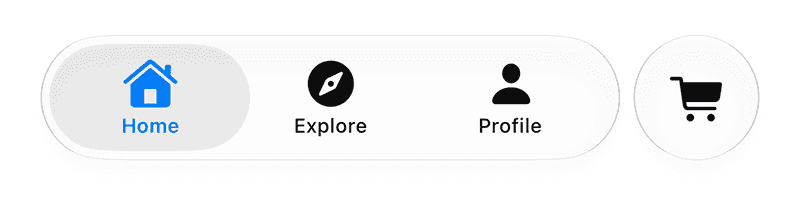
The system automatically applies additional visual emphasis to the Cart tab, helping users discover it more easily.
Notice that Cart is a destination.
Users navigate there.
They don't perform an action directly from the tab itself.
Real-World Use Cases
Let's look at situations where a prominent tab genuinely improves navigation.
E-Commerce App
The shopping cart is often the most valuable destination in the application.
Tab(role: .prominent) {
    CartView()
} label: {
    Label("Cart", systemImage: "cart.fill")
}
Users repeatedly return to review items, modify quantities, and complete checkout.
This is an excellent candidate.
Event Ticketing App
Imagine a ticketing application.
Most users open the app because they need access to tickets.
Tab(role: .prominent) {
    MyTicketsView()
} label: {
    Label("Tickets", systemImage: "ticket.fill")
}
A prominent tab helps users quickly access what matters most when entering an event.
Travel App
Travel applications often revolve around upcoming trips.
Tab(role: .prominent) {
    TripsView()
} label: {
    Label("Trips", systemImage: "airplane")
}
Flights, hotels, itineraries, and boarding passes all live in one destination.
Perfect fit.
Banking Application
For many banking apps, payments are a core workflow.
Tab(role: .prominent) {
    PaymentsView()
} label: {
    Label("Pay", systemImage: "arrow.left.arrow.right")
}
The user still navigates to a destination.
The payment workflow happens inside that destination.
Fitness Application
A fitness app may prioritize today's workout plan.
Tab(role: .prominent) {
    TodayWorkoutView()
} label: {
    Label("Today", systemImage: "figure.run")
}
Users launch the app and immediately know where to go.
.prominent vs Floating Action Buttons
This is where I think many developers will misuse the API.
A Floating Action Button answers:
What is the primary action?
Examples:
- Create Task
- Compose Email
- Add Expense
- Create Invoice
- Upload Photo
A prominent tab answers:
What is the primary destination?
Examples:
- Tasks
- Inbox
- Expenses
- Invoices
- Gallery
Those are fundamentally different questions.
If your app needs a primary action, continue using:
- Toolbar buttons
- Floating action buttons
- Bottom accessory controls
- Contextual actions
The new tab role doesn't replace any of them.
Just Because You Can Doesn't Mean You Should
One of the advantages of SwiftUI is that it makes many things easy.
That doesn't always mean those things are good design.
You can absolutely create a prominent "+" tab.
You can absolutely launch a sheet from it.
You can absolutely make it behave like a floating action button.
But doing so changes the meaning of a tab and creates an inconsistent navigation experience.
The strongest SwiftUI apps usually work with platform conventions instead of fighting them.
The .prominent role becomes most valuable when it reinforces existing navigation principles rather than replacing them.
Accessibility and User Expectations
Prominence creates hierarchy.
Hierarchy communicates importance.
That means every prominent tab should earn its position.
Before applying the role, ask yourself:
- Is this destination objectively more important?
- Is it visited more frequently than other tabs?
- Does emphasizing it reduce navigation effort?
- Would users benefit from finding it faster?
If the answer is yes, use .prominent.
If the answer is no, a standard tab is usually the better choice.
Remember:
If every tab feels important, none of them feel important.
Conclusion
The new .prominent tab role is one of those APIs that appears simple but carries important design implications.
It isn't a replacement for a floating action button.
It isn't a replacement for a toolbar action.
It isn't a replacement for the "+" button in your navigation bar.
Instead, it gives developers a native way to emphasize the most important destination in their application while preserving the meaning and predictability of a tab bar.
My rule is simple:
If tapping it takes the user somewhere, it might deserve .prominent.
If tapping it performs an action, it probably doesn't.
A prominent tab is still a tab.
And that's exactly why the feature is useful.
If you have suggestions or opinion, feel free to connect with me on X and send me a DM. If this article helped you, Buy me a coffee.