SwiftUI Text Selection Improvements in iOS 27
One of the smaller SwiftUI improvements in iOS 27 makes a surprisingly big difference to the user experience.
If your app uses the textSelection(_:) modifier, users can now select only the portion of text they want, instead of being limited to actions on the entire Text view.
This change requires no code changes - your existing SwiftUI code automatically adopts the new behavior when running on iOS 27.
The Existing API
SwiftUI has supported selectable text for several releases through the textSelection(_:) modifier.
Text("""
        SwiftUI makes it easy to build beautiful apps across Apple platforms.
    """)
    .textSelection(.enabled)
That's all you need to make a Text view selectable.
What's New in iOS 27?
Starting with iOS 27, touching and holding a selectable Text view now displays the familiar system text selection handles and selection highlight.
Users can:
- Select a specific word
- Drag the selection handles to adjust the range
- Copy only the selected portion of text
This matches the text selection experience users expect throughout the system.
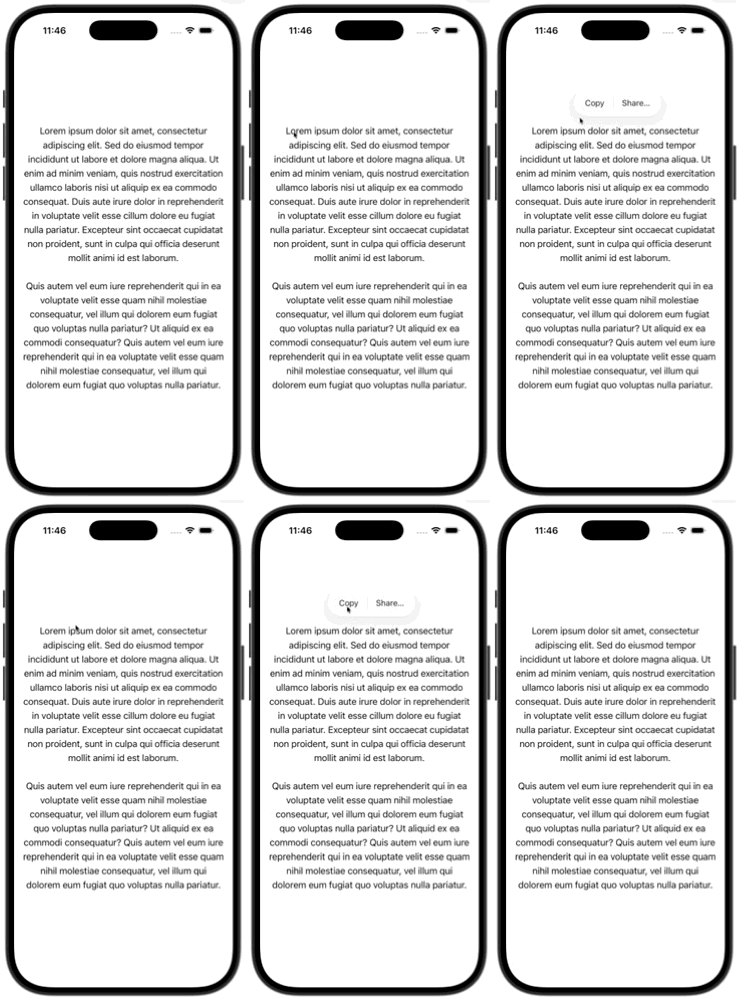
iOS 26
Context menu operates on the entire Text view.
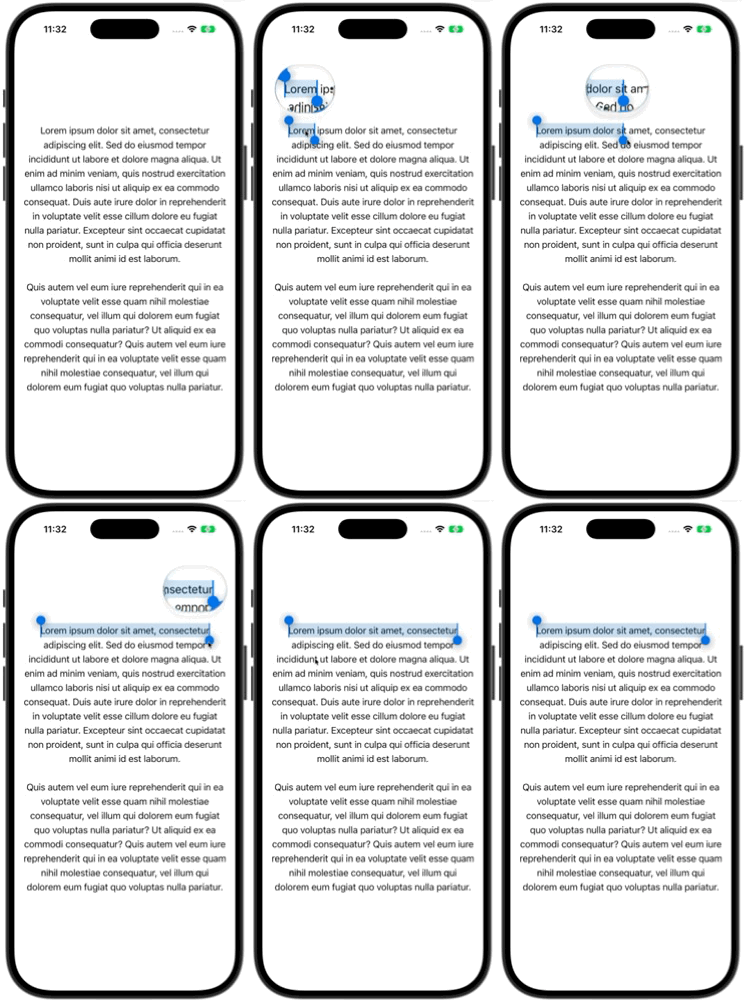
iOS 27
Native text selection handles allow selecting a specific range.
Behavior Comparison
| iOS 26 and Earlier | iOS 27 |
|---|---|
| Long press shows the system context menu immediately. | Long press enters text selection mode. |
Menu actions apply to the entire Text view. |
Users can select a specific range of text. |
| Partial text selection isn't supported. | Native range selection is fully supported. |
Why This Matters
This improvement makes selectable text much more useful in apps that display larger blocks of content, such as:
- Documentation
- Articles
- Release notes
- Code snippets
- Logs and debug output
- Educational content
Instead of copying an entire paragraph, users can now copy only the sentence, word, or code fragment they need.
No Migration Required
The best part is that this enhancement is completely automatic.
If your app already uses:
.textSelection(.enabled)your app gains the improved selection behavior on iOS 27 without any additional code.
Reference
Apple Developer Documentation – textSelection(_:)
Conclusion
textSelection(_:) hasn't changed, but its behavior on iOS 27 has.
By bringing native range selection to SwiftUI Text views, Apple makes selectable text feel more consistent with the rest of the system and significantly improves usability for content-heavy apps.
If you've already enabled text selection in your app, your users will automatically benefit from this improvement when running on iOS 27.
Thank you for reading. If you have any questions feel free to follow me on X and send me a DM. If this article helped you, Buy me a coffee.